ShopDreamUp AI ArtDreamUp
Deviation Actions








Description
Modeled in 3dsmax, rendered in Octane render.
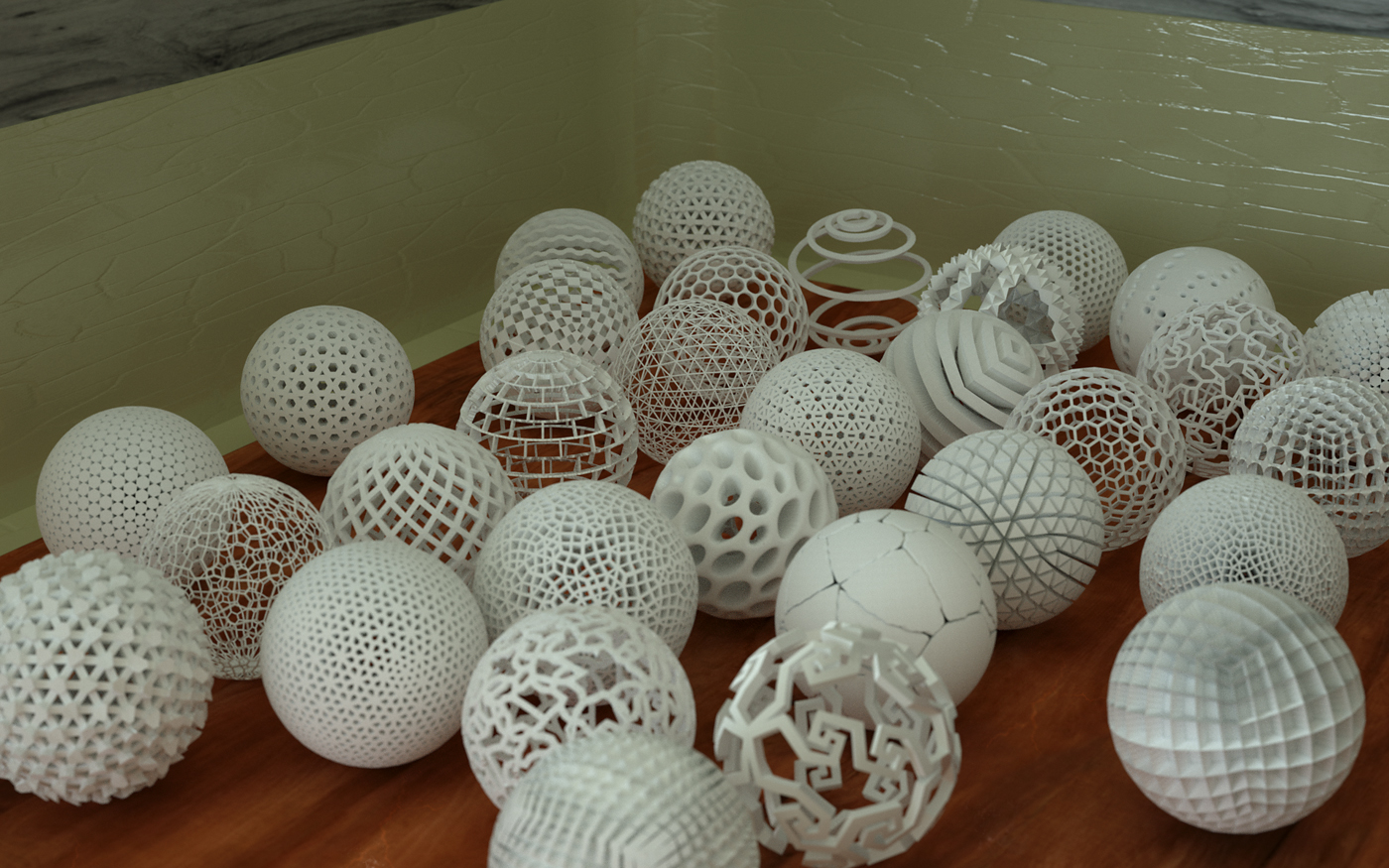
One of the topics discussed recently in my class was Spherical Geometry. By definition, it's nearly identical to planar, with some distinction. We used a third party program along with 3dsmax to study Euclidean and hyperbolic geometry, respectively. Then the assignment was to create our own unique tessellations on a sphere. We were able to seek out geometric assistance through 3rd party applications or plugins if necessary, but the end result needed to be imported into 3dsmax for final presentation.
Well, I didn't actually use any 3rd party software for my presentation; all of the tessellations I created in this image were done directly in Max, however I did take inspiration from tessellations and panels created by people in other applications. I used a free 3dsmax plugin called "Populate" to panel some of the spheres with my own original shapes, while most of the others were simply done using the Graphite Modeling and re-topology tools in 3dsmax 2013. This was well within the rules of the assignment, as long as the resulting model was exportable as .obj, and could be used universally in earlier versions of 3dsMax.
I'm sure you will be able to recognize some of these different tessellations, but hopefully you will see some topology here that is unique as well. Here is the wireframe clay render if anyone is interested in examining the underlying topology flow.
One of the topics discussed recently in my class was Spherical Geometry. By definition, it's nearly identical to planar, with some distinction. We used a third party program along with 3dsmax to study Euclidean and hyperbolic geometry, respectively. Then the assignment was to create our own unique tessellations on a sphere. We were able to seek out geometric assistance through 3rd party applications or plugins if necessary, but the end result needed to be imported into 3dsmax for final presentation.
Well, I didn't actually use any 3rd party software for my presentation; all of the tessellations I created in this image were done directly in Max, however I did take inspiration from tessellations and panels created by people in other applications. I used a free 3dsmax plugin called "Populate" to panel some of the spheres with my own original shapes, while most of the others were simply done using the Graphite Modeling and re-topology tools in 3dsmax 2013. This was well within the rules of the assignment, as long as the resulting model was exportable as .obj, and could be used universally in earlier versions of 3dsMax.
I'm sure you will be able to recognize some of these different tessellations, but hopefully you will see some topology here that is unique as well. Here is the wireframe clay render if anyone is interested in examining the underlying topology flow.
Image size
1400x875px 824.64 KB
© 2012 - 2024 LuxXeon
Comments82
Join the community to add your comment. Already a deviant? Log In

I love that spiral one towards the top!